
Path of the Idle Cultivator Hotkeys
Pause, speed keys, the speed bar, Settings, and PC bulk buy.
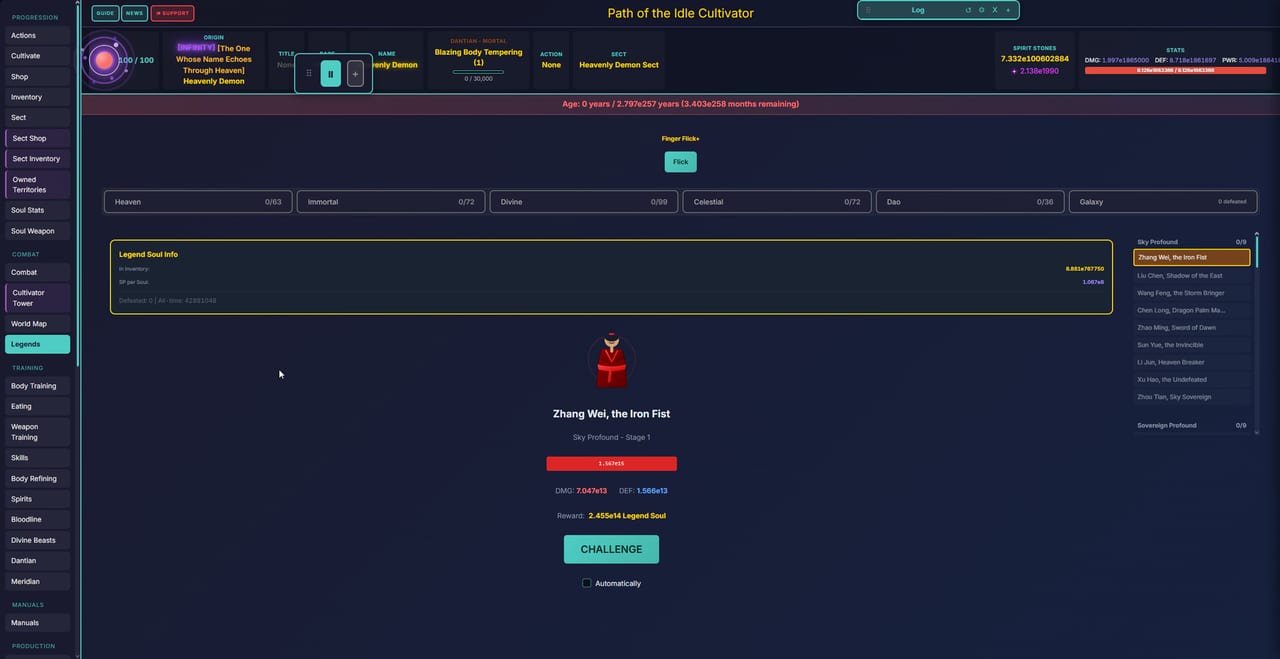
Path of the Idle Cultivator is a mouse-and-tap idle game first. You sit, you click Cultivate, you open tabs. A small keyboard layer still matters on PC, because tribulations run on a timer, pills stack in the sect inventory, and leaving the client at 1x overnight is a different life from leaving it at 10x. This page is the lookup for that layer. Pair it with Controls for the rest of the HUD, and with Getting Started if you have not finished a first rebirth.
Steam Early Access opened on 5 Sep 2026. The same client still runs on itch.io (HTML5, Windows zip, Android APK) and at cultivator-path.com. Hotkeys below match the Steam / desktop HUD in v0.5. Mobile and the browser share the speed bar but not every modifier key.
Header buttons (every platform)
The top bar is not a hotkey row, but it is the first place players miss:
- Guide — in-game systems text. When this wiki and your build disagree, trust Guide.
- News — the live changelog. Fuller than itch posts from v0.3.5 onward.
- Support — the path the UI gives you when something breaks.
Those three sit on the same line as the title. They are not bound to 1–9.
Pause: P
Press P to pause and unpause. The speed bar also has a Pause control if you would rather click. Pause is the right move before you:
- export a save
- dump a stack of pills or manuals you cannot undo
- open a tribulation you are not ready to fight
- walk away from a browser tab that will otherwise keep aging the life
There is no separate “combat pause” documented. If a duel is already rolling, pause the whole client rather than hunting for a hidden key.
Speed keys 1–9
The HUD shows a 1x baseline plus numbered steps. The numbered keys do not start at 1x.
| Key | Speed |
|---|---|
| (click 1x on the bar) | 1x |
1 | 2x |
2 | 3x |
3 | 4x |
4 | 5x |
5 | 6x |
6 | 7x |
7 | 8x |
8 | 9x |
9 | 10x |
v0.2.2 first shipped numbered speed keys as 1–8. The current HUD labels 1–9 through 10x. If an old screenshot stops at 8, you are looking at a pre-v0.5 strip.
Use 1x when you are reading a new panel, assigning disciples, or watching a tribulation you might still lose. Use 10x for long Cultivate stretches, map ticks, and anything you have already automated. Higher speed ages the life faster. That is the point, and also the way you run out of lifespan in a hurry.
The speed bar itself
The strip at the bottom of the desktop HUD (and the matching cluster on mobile) is more than a multiplier:
- Pause and the 1x–10x steps
- Settings — the gear on the speed tab
- Buy — bulk purchase / take-all, the mobile substitute for a modifier key
- Reset position, log, and related layout controls on some builds
If a modal covers the strip on a phone, that is a known layout complaint the developer has already patched more than once. Rotate, close the modal, or look for Buy on the speed bar before you assume bulk buy does not exist.
Settings, export, import
Settings is the gear on the speed tab, not a buried menu in Combat. That is the official save-transfer path:
- Pause (
P). - Open Settings (gear on the speed tab).
- Export the save.
- On Steam, import that file.
The developer confirmed that path when players asked how to move a browser or APK life onto Steam after Early Access opened. Steam Cloud can keep the Steam slot in sync after that, but it will not invent an itch save for you. Export first.
The same Settings panel is where you should look before you reset a position, wipe a layout, or chase a “missing” option that is simply off-screen on a small display.
Ctrl+Shift bulk buy (PC)
On PC, hold Ctrl+Shift to bulk-buy or take a whole stack instead of clicking one item at a time. The developer stated that directly: press Ctrl+Shift on PC, or use the Buy control on the speed bar. The example at the time was taking all pills from the sect instead of tapping them one by one.
Notes that keep people from breaking a life:
- This is a PC chord. Touch clients do not have Ctrl and Shift. Use Buy on the speed bar.
- Bulk actions spend the currency you can see. Pause first if the stack is expensive.
- If a modal sits on top of the speed bar on mobile, close it, then tap Buy.
- There is no documented controller map. Keyboard and mouse, or touch, are the supported inputs.
PC versus mobile
PC (Steam Windows zip, itch Windows zip)
Ppause,1–9speed, Ctrl+Shift bulk.- Hover tooltips on manuals, nodes, and realm names.
- Easier to keep Guide / News / Support in view while you play.
HTML5 / cultivator-path.com
- Same speed bar. Keys work if the browser has focus and is not capturing digits for something else.
- Export before you clear site data. Browser storage is not Steam Cloud.
Android APK and touch
- Tap Pause and speed steps. No Ctrl+Shift.
- Buy on the speed bar is the bulk path.
- If a panel will not open, it is often a layout overlap, not a missing hotkey. See Controls.
What is not a hotkey
A lot of “why won’t this tab open” reports are origin gates, not missing keys. Heaven Chosen and similar paths can keep Breakthrough closed until a Heaven fight is done. That is a progression lock, documented on Getting Started and the breakthrough guides, not something P or 9 will fix.
There are also no documented binds for Cultivate, Rebirth, or individual combat skills. Those stay on their panels. Do not invent numpad combat macros from other idle games.
After a patch
v0.5 overhauled combat and started a cave/dungeon pass. Speed keys did not go away, but the combat tab around them did change. If a shortcut stops doing what this page says, open News in the header, then check Patch Notes. This page tracks the HUD, not every combat formula.
Keep this cheat-sheet next to Realm List when you are mapping a new life: one page for the clock, one page for the stage name. The keys do not get you through a tribulation you cannot win; they only stop you from fighting it at the wrong speed.
Frequently Asked Questions
Quick answers to the most common questions.
What does the P key do?
P pauses and unpauses the whole client. Use it before exports, bulk buys, and tribulations you might still lose.
Do keys 1–9 set 1x through 9x?
No. The bar’s 1x control is the baseline. Key 1 is 2x and key 9 is 10x. v0.2.2 originally showed 1–8; the current HUD labels 1–9.
How do I bulk buy on PC versus mobile?
On PC hold Ctrl+Shift. On mobile or HTML5, use Buy on the speed bar. The developer gave both paths when players asked about taking all sect pills.
Where is Settings?
The gear on the speed tab. That is also where you export a save to import on Steam.
Why does Breakthrough still not open when I press keys?
Hotkeys do not unlock tabs. Some origins must finish a Heaven fight first. Read Controls and Getting Started.
Do hotkeys work in the browser?
They work if the game has keyboard focus. Click the canvas first. Phones should use the on-screen speed bar instead of chords.