
Path of the Idle Cultivator Tools Hub
Keyboard shortcuts, the speed bar, and a living list of cultivation realms.
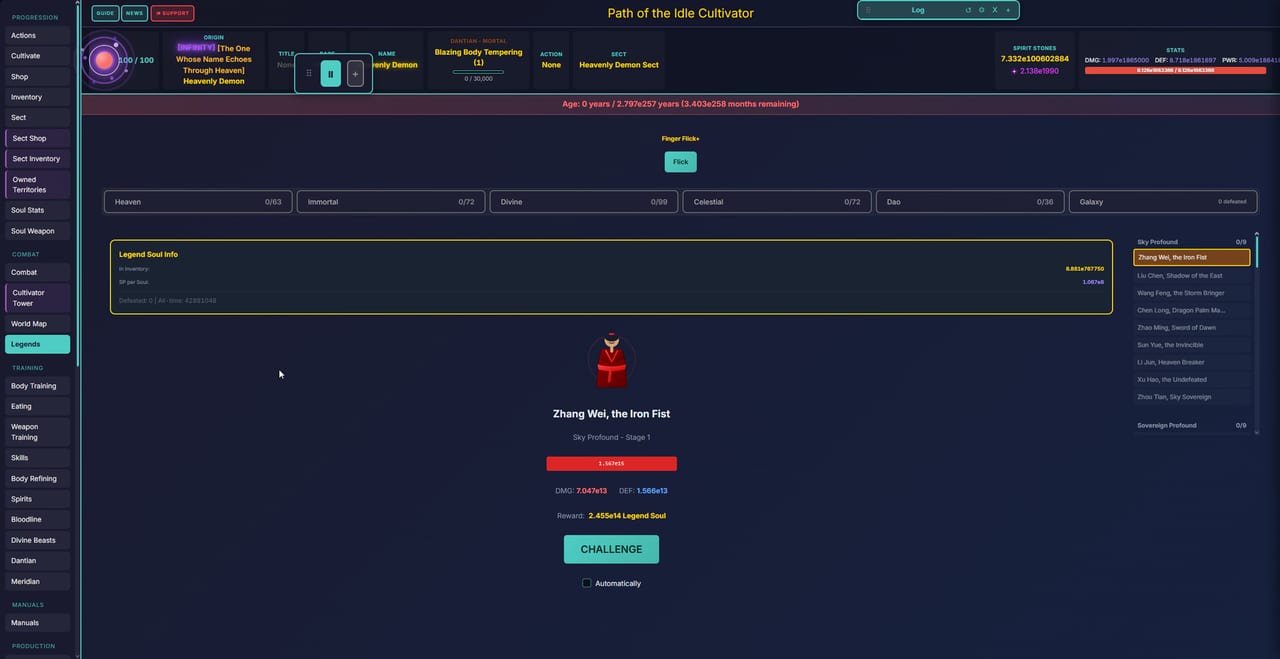
This hub is the short-form toolkit for Path of the Idle Cultivator: keys, speed, save export, and realm names you can actually see in the HUD. It is not a second copy of Getting Started. Use that page to sit, gather Qi, and survive the first tribulation. Come here when a shortcut, a speed step, or a realm string flashes too fast to write down.
The game is a single-player idle xianxia by Wuxia Dev / Wuxia Games. Steam Early Access opened on 5 Sep 2026 (app 5007580) as a free-to-play Windows build. itch.io still hosts HTML5, Windows zip, and Android APK builds, and cultivator-path.com is the web client. English is the supported language. Nothing on this hub is a promo-code list.
What lives under Tools
- Hotkeys — Pause (
P), speed keys1–9, the speed bar, Settings (the gear on that strip), and the PC-only Ctrl+Shift bulk-buy note from the developer. - Realm List — Mortal through Dao names from the UI, Profound stages, extra ladders such as Chaos Realm, Ascension 1 versus the unfinished Ascension 2 slice, and Galaxy Map world tiers.
If you want click-by-click UI help after the keys, open Controls. The in-game header also has Guide, News, and Support. The Guide tab is still the first place to confirm a system this wiki has not caught up with.
Speed bar, pause, and saves
The speed strip sits with Pause, a 1x baseline, and numbered steps up to 10x. Default speed is 1x. Key 1 jumps to 2x and key 9 jumps to 10x. P pauses. The gear on that strip is Settings. Export a save there, then import it on Steam if you started on itch or the browser. That is the transfer path the developer posted when players asked about moving a life onto the Steam build.
Mobile and HTML5 players tap the same strip. There is no Ctrl+Shift chord on a phone; the Buy control on the speed bar is the bulk path the developer pointed at when players asked about grabbing many pills at once. Full steps live on Hotkeys.
Realms without spoiling the climb
Steam copy talks about dozens of realms from Body Tempering to Immortal Ancestor. itch copy talks about fifty realms across seven tiers, Mortal to Dao. The HUD is more specific: a mortal start can show Blazing Body Tempering, later lives show Earth Profound, Sky Profound, Grand Dao, Heaven Immortal, and Chaos Realm. Galaxy Map worlds carry their own Tier numbers, which are not the same thing as your personal cultivation realm.
Names move in Early Access. v0.5 finished Ascension 1 and overhauled combat; v0.4.2 started a playable-but-unfinished Hell and Heaven slice aimed at finishing Ascension 2. Treat Realm List as a field notebook, then confirm the current string in your save.
How to use this hub
- Learn the keys on Hotkeys before you leave a tribulation running overnight.
- Skim Realm List so Earth Profound 9 does not look like a missing tab.
- Return to Getting Started for the first-life loop.
- Keep Controls open if a panel will not respond on touch.
This wiki is unofficial. Optional Patreon Fate bonuses do not gate core content. If a hotkey or realm name disagrees with the News tab after a patch, trust the build you are running.
The tools pages stay short on purpose. They are cheat-sheets you can keep beside the Cultivate button, not a second novel. When a new origin or Ascension tab appears, we update the list; until then, the Guide header and Discord remain the live errata.
Frequently Asked Questions
Quick answers to the most common questions.
Where do I find hotkeys and the speed bar?
Open Hotkeys. Pause is P. Keys 1–9 set 2x through 10x. The gear on the speed strip is Settings, including save export.
Is there a complete list of every cultivation realm?
No. Realm List collects names we can see in the UI and in patch notes. Early Access still renames stages, so confirm the string on your HUD.
Do these tools replace the in-game Guide?
No. Use this hub as a lookup, then read Getting Started and Controls. The header Guide and News tabs are still canonical for your build.
Can I move an itch or browser save onto Steam?
Yes. Settings (gear on the speed tab) → export, then import on Steam. The same path is covered on Hotkeys.