
Path of the Idle Cultivator Controls, Speed Bar, and Save Export
P pauses. 1–9 raise speed (1 = 2x through 9 = 10x). The gear on that bar exports your life.
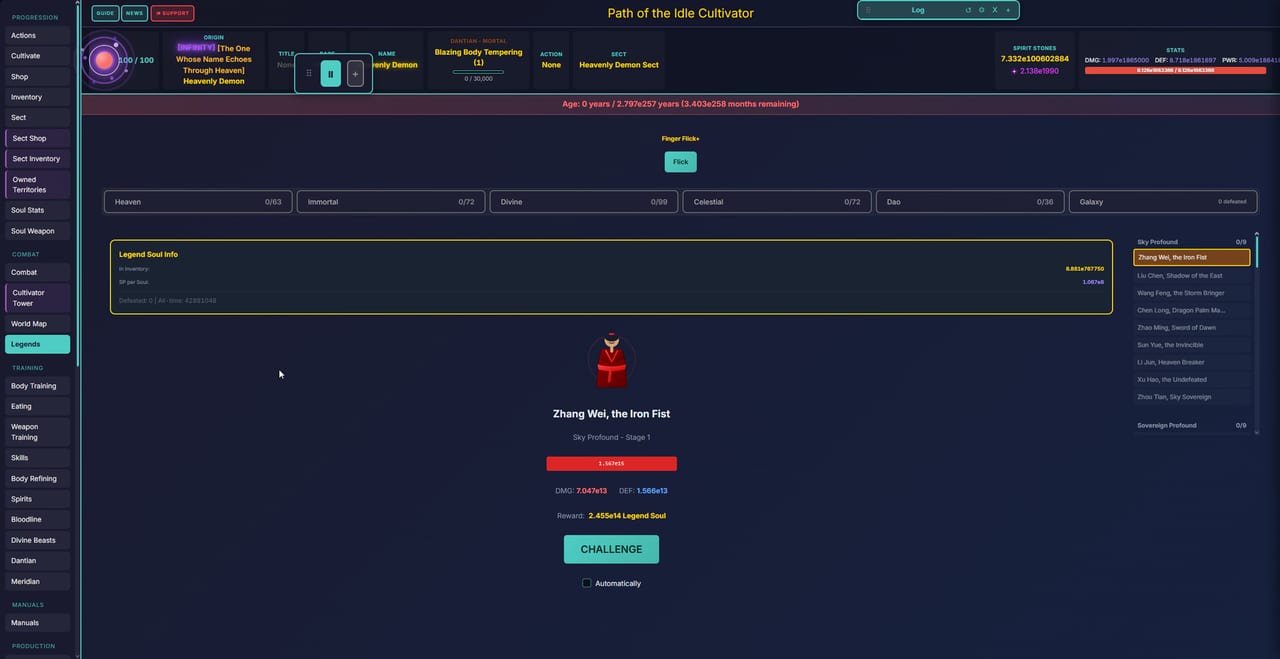
Path of the Idle Cultivator is keyboard-and-mouse on desktop, touch on Android and HTML5, and still English-only. Steam Early Access opened on 5 Sep 2026. There is no controller overlay, and the client is single-player. This page is pause, speed, settings, and save export — the buttons that sit on every life while Cultivate, tribulations, and the map change around them.
A compact cheat sheet lives on the hotkeys tool. First-hour order lives on Getting Started. If you only came here because Steam and the browser disagree about your Qi, skip to Save export below.
Pause and speed
- P — pause. Use it on tribulations, extra bosses, and any furnace you do not want to complete at 10x by accident.
- 1–9 — raise speed. The HUD is easy to misread: 1 = 2x, 2 = 3x, 3 = 4x, 4 = 5x, 5 = 6x, 6 = 7x, 7 = 8x, 8 = 9x, 9 = 10x. There is a 1x display on the bar as well; do not assume the number key matches the multiplier.
Older patches documented 1–8 only; current HUD goes through 9 = 10x. If a key does nothing, click the matching speed chip — some HTML5 embeds steal number keys.
Leave speed low for:
- First Breakthrough extra-boss chains (Breakthroughs). Finish is a one-click lock.
- Alchemy purity you have not memorised (Alchemy and Forge).
- Heaven battles on Heaven Chosen while the Breakthrough tab is still a quest gate.
Leave speed high for Cultivate stretches you already understand and for map travel between nodes you can win. Lifespan already speeds ticks as you live longer (How to Play); stacking 10x on a million-year life is how a “quick look at Discord” becomes a skipped extra boss.
The speed bar is also Settings
The settings gear sits on the speed bar, not in a far corner of a nested menu. That is easy to miss on a first sitting because the bar looks like a pure multiplier widget. The gear is:
- Export / import save — browser or APK toward Steam, or the reverse.
- Other client settings (reset position, log, and similar HUD tools live next to it).
Developer confirmation: Settings (gear on the speed tab) → export, then import on Steam. Do this before you uninstall an itch build, clear browser data, or swap phones. Closing the HTML5 tab is not an export.
On mobile, the speed bar can hide behind a modal. If bulk-buy or settings look missing, close the overlay. PC bulk grabs from sect storage have used Ctrl+Shift style modifiers; on phones the equivalent lives in the Buy area on that same bar. Rotate the device if a workshop is eating the chips.
PC versus Android versus HTML5
| Client | Input | Notes |
|---|---|---|
| Steam (Windows) | Keyboard, mouse | Best place for hotkeys 1–9 and P. Import here after a browser life. |
| itch Windows zip | Keyboard, mouse | Same binds. Version numbers can differ from Steam in a given week. |
| itch HTML5 / cultivator-path.com | Keyboard if available, mouse, touch | Browser may steal number keys. Export often. |
| Android APK | Touch | Pause and speed are on-screen. Export before you swap devices. |
Play on Steam, itch.io, or cultivator-path.com. The game is free-to-play. Optional Patreon Fate bonuses do not gate these buttons. Official invites and stores: links hub.
Header buttons Guide / News / Support are not hotkeys. Guide is the in-game Info Guide — read it when a tab unlocks. News tracks the same patches this wiki summarises on updates and patch notes. Support is how you reach the developer without guessing a Discord search.
What the rest of the HUD is doing
You will collect a lot of tabs: Cultivate, Shop, Inventory, Sect, Combat, Cultivator Tower, World Map, Legends, Body Training, Eating, Weapon Training, Skills, Body Refining, Spirits, Bloodline, Divine Beasts, Dantian, Meridian, Manuals, Alchemy, Talismans, Forging, Cooking, Legacy, Achievements, Quests, Fate Cards, Auction House, Fate Shop, Ascension, Laws, Inner Realm, Galaxy Map, Divine Pagoda, Clan, Deities, Divine Forge, Empyrean Menagerie, Divine Alchemy, Divine Cooking, Chaos Realm.
None of those are bound to 1–9. Number keys are speed only. Do not try to chord origin swaps. Origins change through play and rebirth (origins hub, origins tier list), not through a control scheme.
Dantian (the screenshot on this page) is a panel you click: Size, Purity, Impurity, Demonic %, attunement. There is no secret purity hotkey. Fan’s questline is what later lets you fuse low-tier elemental nodes after you control that panel — a quest, not a bind. Bloodline Auto Absorb is a toggle on that canvas, not a keyboard toggle.
Save export as a habit
Export when:
- You move from HTML5 or APK to Steam (or back).
- You are about to test a greedy extra boss or a Heaven battle.
- You are about to rebirth with a soul weapon and a full legacy vault you would not like to reconstruct from memory.
- A patch just landed (Steam Early Access) and you want a rollback file even if the game migrates cleanly.
Import on the destination client, then sit on Cultivate long enough to confirm Qi, stones, and origin match. If they do not, do not keep playing on the empty file. Pause (P), import again, ask Discord with the export attached.
Public promo codes, when they exist, are not entered on the speed bar. See codes. Do not type random strings into Settings.
Controls will not win a tribulation. They will stop you from winning one at 10x with Finish already clicked, and they will stop you from losing a three-day HTML5 life to a cleared cache. Pause on purpose. Speed on purpose. Export like the next client is already waiting. Then go back to the Guides Hub for the system that actually stalled — map, sect, forge, or the fifty-turn duel you paused this file to survive.
Frequently Asked Questions
Quick answers to the most common questions.
What does the 1 key do?
Speed 2x, not 1x. Keys 1–9 run 2x through 10x. Full sheet: hotkeys tool.
How do I pause?
Press P on keyboard clients, or use the pause chip on the speed bar (touch). Pause before extra bosses and Finish clicks — Breakthroughs.
Where are Settings?
The gear on the speed bar. That is also save export/import. First-hour reminder: Getting Started.
Can I move a browser save to Steam?
Yes. Settings (gear on the speed bar) → export, then import on Steam. Works from itch HTML5, Windows zip, and Android APK as well.
Why do number keys do nothing in the browser?
The embed or the browser may steal them. Click the speed chips instead. Android uses those chips only. See How to Play for when high speed is a bad idea.
Is there a hotkey for Breakthrough or origin swap?
No. Number keys are speed only. Closed Breakthrough tabs are usually a Heaven Chosen quest gate — Heaven Chosen.